From reactive maintenance to predictive building intelligence
Designing the occupancy experience for Carrier’s smart-building platform — so facility managers can see how a building is actually being used.
PRODUCT DESIGNER • ENTERPRISE SAAS • ABOUND SPACES MVP


OVERVIEW
Abound is Carrier's smart-building platform
It brings air quality, energy, and occupancy data into one place so building teams can run healthier, more efficient spaces. As part of the Abound Spaces MVP, I led design for the occupancy experience — the part of Abound that answers a deceptively simple question: how is this building actually being used?
The work spanned the full picture of how a facility manager moves through space — from a whole portfolio of buildings down to a single room — across four connected surfaces: portfolio occupancy KPIs, a drill-down occupancy panel, a floor-plan heatmap, and custom alerts and exception reporting.
THE PROBLEM
The data was there. Nobody could read it.
Abound’s sensors already captured occupancy across buildings, floors, and rooms. It was surfaced on spreadsheets which was hard to act on. A facility manager couldn’t quickly see which spaces were over capacity, which were sitting empty, or how a building trended over a week.
THE SOLUTION
By progressively revealing information—from portfolio to room-level details—we created an experience that supports both quick decision-making and deep operational analysis.
01.Portfolio
Occupancy KPIs on the building list
Occupancy became a first-class lens on the portfolio: current occupancy and percent capacity per building, 24-hour and weekly averages, and week-over-week change — with a hover card for the detail. Facility managers triage an entire portfolio at a glance and know exactly where to look next.


02.Spacial
Occupancy map at floor level
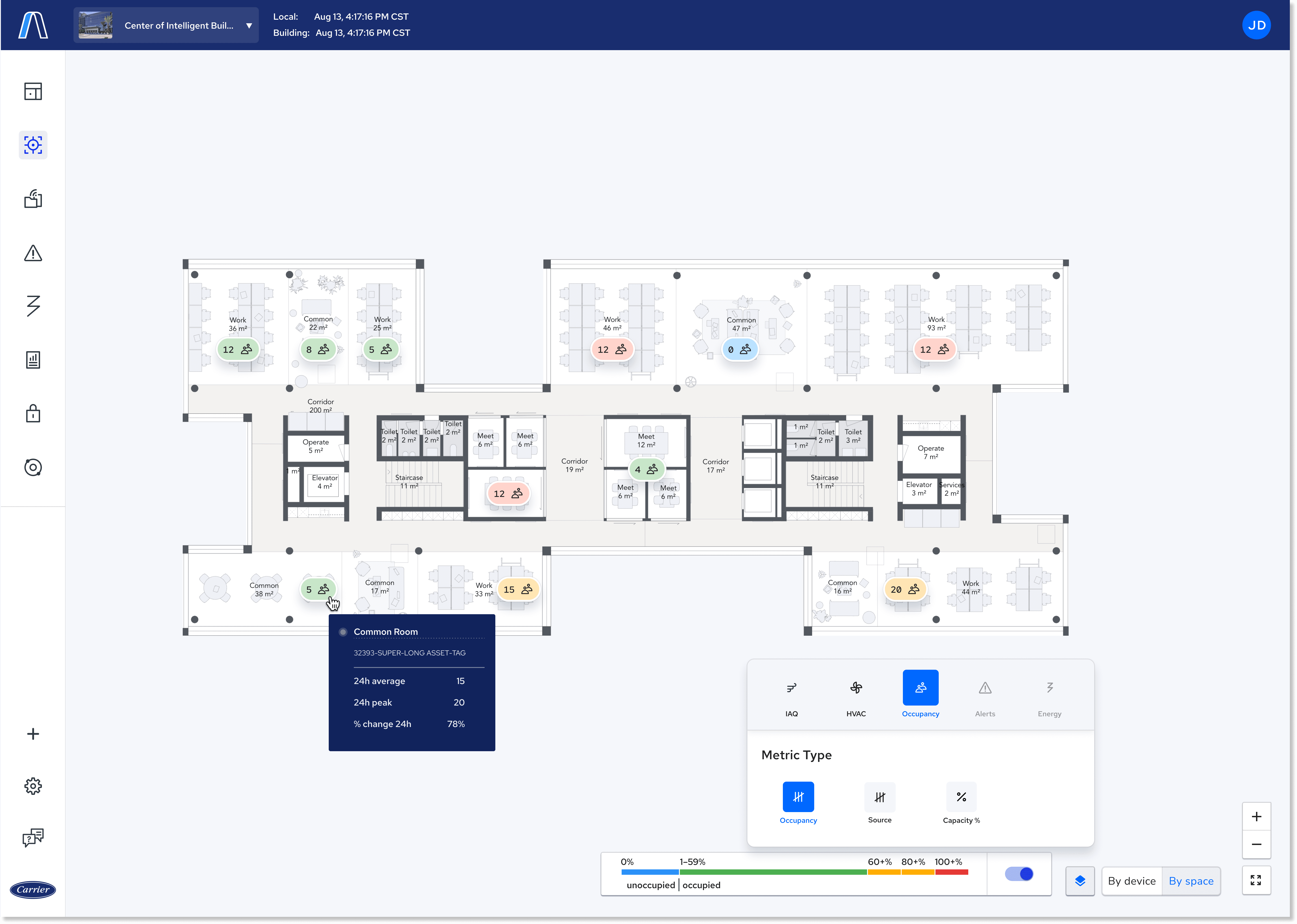
A floor-plan heatmap renders occupancy against admin-entered capacity on a green→red scale, turning raw numbers into an instant spatial read of the building — the request that started the whole project.
The occupancy map overlay — a floor-plan heatmap of occupancy against capacity on a green→red scale.
03.Drill-down
One consistent panel, every level of detail.
From building to floor to room to common area, a consistent panel shows occupancy over time, percent of capacity, today's peak, and color-coded floor and room capacity bars — the same mental model at every level of detail.

04.Stay notified
Custom alerts & exception reporting
Facility managers create their own occupancy alerts, and occupancy and occupancy-capacity became selectable metrics in the Exceptions Report — so teams can monitor trends and get told when a space crosses a threshold instead of checking manually.
Creating an alert spans about a dozen screens — pick a metric, scope it to spaces or devices, set the condition, then write the message and choose who's notified. Rather than a long linear wizard, I anchored the whole build in a persistent Builder Hub, so the alert assembles in front of you and you never lose your place.


The occupancy map overlay — a floor-plan heatmap of occupancy against capacity on a green→red scale.
KEY TAKEAWAY
The data was never the problem — the translation was.
The win didn't come from more analytics. It came from giving the same occupancy data the right lens for each moment — a portfolio glance, a drill-down, and a spatial map — and putting it where decisions actually happen. When the experience did the interpreting, people came back, and usage rose 25%.